Introduction
The LATAM Pass PNA Member Enrollment API is how our partners enroll new customers into the LATAM Pass program, in compliance with the Personal Data Protection Laws of the countries where we operate.
The API receives the customer identity data sent by the partner and attempts to create a new account or reconcile it with an existing one, returning the result synchronously.
To make requests to the API, you must first obtain an APP to access the credentials and generate your access token. See the documentation on how to start your tests in the Portal or on Authentication for all the information. You must request access for the app to the "API Member".
⚠️ Important: obtaining credentials alone is not enough to use the account creation endpoint. You must contact the LATAM Acquisition team at grp_acquisition_squad@latam.com so that your
client_idcan be associated with an authorized partner profile. Use the subject: "Request to enable API usage for a partner". In the email body, provide yourclient_idfor each environment. Requests made with an unassociatedclient_idwill be rejected with a403 Forbiddenerror.
Process flow
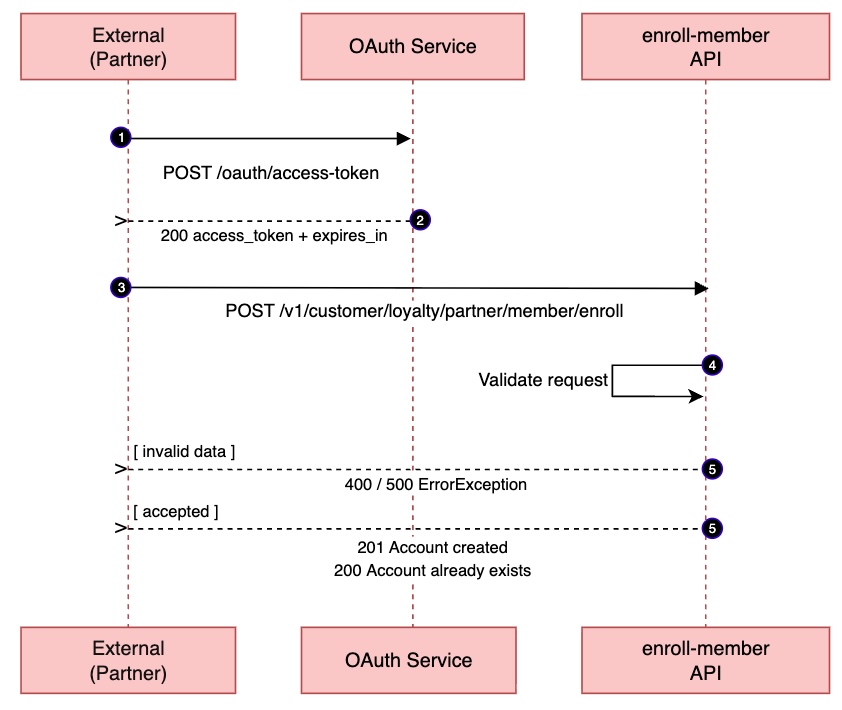
Request
The endpoint receives the customer data in the request body in JSON format and attempts to create or reconcile a LATAM Pass account.
| Property | Value |
|---|---|
| Method | POST |
| Path | /v1/customer/loyalty/partner/member/enroll |
Header
| Header | Required | Description |
|---|---|---|
Client_id | Yes | Value obtained from the Dev Tools > My Apps > Client ID menu. |
Access_token | Yes | Access token obtained during authentication |
X-Request-Id | No | Idempotency/correlation token provided by the partner. Maximum 64 characters. |
Request Body
Top-level object fields
| Field | Type | Required | Description |
|---|---|---|---|
name | string | Yes | Customer first name. Unicode letters and spaces only. Min. 2, max. 80 characters. |
lastName | string | Yes | Customer last name. Same rules as name. Min. 2, max. 80 characters. |
email | string | Yes | Customer email address. Max. 254 characters. The @ character is required. |
birthDate | string | Yes | Birth date in ISO-8601 format (YYYY-MM-DD). |
gender | string | No | Customer's gender. Possible values: M (Male), F (Female), I (Indeterminate). |
document | object | Yes | Customer identity document. See details below. |
phone | object | Yes | Customer contact phone. See details below. |
termsAndConditionsAccepted | boolean | Yes | Acceptance of the LATAM Pass program Terms and Conditions is required to create an account. This value must reflect the user's explicit acceptance in the partner's flow: the partner must present the Terms and Conditions and record the user's active consent. |
parentalConsent | boolean | Conditional | Required for Brazilian residents under 12 years old. When true, it indicates that the parent or legal guardian has actively provided consent, declaring their relationship with the minor and accepting the processing of personal data by LATAM. |
⚠️ Important: When an account is created, an email is sent to the address provided during registration requesting the creation of a LATAM Pass access password. For security reasons, when testing, use only email addresses that you have access to, preventing third parties from accessing or taking control of the created account.
We recommend using email aliases, for example:
document object fields
| Field | Type | Required | Description |
|---|---|---|---|
documentCountry | string | Yes | ISO 3166-1 alpha-2 country code where the document was issued. Supported values: CL, EC, CO, BR, PE, AR, US. |
documentType | string | Yes | Document type according to the user's country. See the rules below. |
documentNumber | string | Yes | Document number, without spaces. Alphanumeric, periods and hyphens only. From 4 to 32 characters. |
Rules for the documentType field by country
| documentCountry | Allowed documentType values |
|---|---|
| BR | CPF |
| CL | DNI, RUT, PASSPORT |
| PE | DNI, PASSPORT, CEPE |
| AR, CO, EC | DNI, PASSPORT |
| US | PASSPORT |
Using a
documentTypenot listed for the country of the provided document results in a 400 error.
Rules for the documentType field by document type
documentCountry | documentType | Validation | Example |
|---|---|---|---|
| BR | CPF | Exactly 11 digits with a valid check digit. With or without '.' or '-' | 11122233345 |
| CL | DNI, RUT | 8 or 9 characters (7–8 digits + 1 check digit). All characters except the last must be digits. Last character: 'K' (or 'k') or digit '0–9'. With or without '-' | 11111111-1 |
| PE | DNI | Exactly 8 digits. With or without '.' or '-' | 12345678 |
| PE | CEPE | Exactly 9 digits. With or without '.' or '-' | 123456789 |
| AR | DNI | 7 to 9 numeric digits; OR M/F followed by exactly 7 digits (migratory). | 12345678 |
| CO | DNI | 5 to 10 digits | 1234567891 |
| EC | DNI | Exactly 10 digits with a valid check digit. | 1621036068 |
| CL, PE, AR, CO, EC, US | PASSPORT | 5 to 15 chars. 'A-Z' or '0-9' | AB12345 |
phone object fields
| Field | Type | Required | Description |
|---|---|---|---|
countryCode | string | Yes | International country calling code, with or without the + sign. E.g.: +55, 56. |
contactCode | string | Yes | Phone number (digits only). From 6 to 15 characters. E.g.: 81998765432. |
Request examples
Minimal request (Brazil)
Full request (Brazil)
Passport request (outside Brazil)
Request for Brazilians under 12 years of age (Brazil)
Full request (Chile)
Response
Success responses
201 — Account created successfully
Returned when a new LATAM Pass account is created for the customer.
200 — Account already exists
Returned when a LATAM Pass account linked to the provided data already exists. The response may contain an access recovery URL (recoveryUrl), when available.
With recovery URL:
Without recovery URL:
Success response fields
| Field | Type | Description |
|---|---|---|
enrollmentAccepted | boolean | Indicates whether the enrollment was accepted. |
code | string | Machine-readable code for the partner's decision. Values: ENROLLMENT_ACCEPTED, ACCOUNT_ALREADY_EXISTS. |
message | string | Human-readable description. Should not be used for integration logic. |
recoveryUrl | string (nullable) | Temporary URL to recover access to the account, when available. |
expiresAt | string (nullable) | Expiration date/time of the recoveryUrl, in ISO-8601 format. |
traceId | string | Trace identifier generated by the API for troubleshooting. |
timestamp | string | Response date/time in ISO-8601 format. |
Error responses
400 — Validation error or malformed request
Returned when there are missing required fields, invalid values, or malformed JSON.
Missing or invalid required fields:
Malformed JSON or incorrect data type:
401 — Missing or invalid credentials
Returned when Client_id or Access_token are missing or invalid.
403 — Not authorized for this operation
Returned when the Client_id is not recognized, or when the credentials are valid but the partner is not authorized for this operation or environment.
Unrecognized client_id:
Not authorized for the operation/environment:
415 — Unsupported media type
Returned when the request Content-Type is not supported. Use application/json.
422 — Enrollment rejected by business rules
Returned when the enrollment is rejected by internal business rules. The specific reason for the rejection is not disclosed.
Manual recovery required:
Generic rejection:
500 — Internal server error
504 — Downstream service timeout
Returned when a downstream LATAM service does not respond in time. The request may be retried later.
Response code summary
| HTTP Status | code | enrollmentAccepted | Description | Action |
|---|---|---|---|---|
201 | ENROLLMENT_ACCEPTED | true | New account created successfully. | Proceed with downstream APIs |
200 | ACCOUNT_ALREADY_EXISTS | true | Account already exists. May contain recovery URL. | Proceed. Offer recoveryUrl if present |
400 | INVALID_REQUEST / JSON_PARSE_ERROR | — | Validation error or malformed JSON. | Check violations array. Fix JSON structure/types |
401 | MISSING_OR_INVALID_CREDENTIALS | — | Missing or invalid credentials. | Renew access_token |
403 | UNRECOGNIZED_CLIENT_ID / NOT_AUTHORIZED | — | Unrecognized client_id or not authorized. | Contact LATAM support. |
415 | UNSUPPORTED_MEDIA_TYPE | — | Unsupported Content-Type. | Add Content-Type: application/json |
422 | ACCOUNT_MANUAL_RECOVERY_REQUIRED | false | Rejected by business rules. | Direct user to LATAM support. |
422 | ENROLLMENT_NOT_ALLOWED | false | Rejected by business rules. | Direct user to LATAM support. / Do not retry. Do not proceed with downstream APIs. |
500 | UNEXPECTED_ERROR | — | Unexpected server error. | Retry with backoff. Log traceId |
504 | GATEWAY_TIMEOUT | — | Downstream service did not respond in time. | Retry with backoff. Log traceId |
Important rule
If
enrollmentAccepted = falseandcode =ENROLLMENT_NOT_ALLOWEDthe partner MUST NOT call any subsequent LATAM Pass API (e.g.: Lifecycle, Accrual, Redemption, or any other downstream API), because the user will not exist in the LATAM ecosystem and those calls will return errors.
Technical documentation
Click here to access it.